


In my previous post, we explored how to create your first agent using the Microsoft Agent Framework, laying the foundation for building intelligent AI systems. If you missed it, check it out here. Now, we take the next step: getting started with workflows. Workflows are the glue that binds agents together, enabling them to collaborate and execute tasks seamlessly. In this post, we’ll dive into the basics of creating workflows, from simple sequential processes to concurrent systems, helping you build smarter and more efficient AI solutions.
Overview
Workflows are where the Agent Framework really stands out. They let you connect agents together so they can work as a team on bigger problems—things a single agent can’t do alone.
In my work, I’ve seen many teams struggle with multi-agent setups: agents calling each other, losing track of context, or running into debugging headaches.
Workflows fix these problems.
You get memory, teamwork, and orchestration—all in one SDK.
📌 This post is based on my hands-on experience as a Cloud Solution Architect. For more background, see my earlier blogs on Semantic Kernel, AutoGen, and multi-agent systems at singhrajeev.com
Workflows Overview
If agents are like doors, workflows are the nervous system—they coordinate, sequence, and optimize how everything works together.
Core Components
The workflow framework consists of four core layers that work together to create a flexible, type-safe execution environment:
Executors and Edges form a directed graph representing the workflow structure
Workflows orchestrate executor execution, message routing, and event streaming
Events provide observability into the workflow execution

Supported Orchestrations
A single agent is useful. But real-world apps need more:
- Sequential processing — for step-by-step workflows (e.g, Research → Write → Review)
- Parallel execution — Multiple analysts working simultaneously
- Conditional routing — Route to the right specialist based on the query
- Human-in-the-loop — Approvals before critical actions
- State management — Remember context across the entire pipeline
For more details, see: workflow design patterns
| Pattern | Description | Typical Use Case |
| Concurrent | A task is broadcast to all agents and processed concurrently. | Parallel analysis, independent subtasks, ensemble decision making. |
| Sequential | Passes the result from one agent to the next in a defined order. | Step-by-step workflows, pipelines, multi-stage processing. |
| Group Chat | Assembles agents in a star topology with a manager controlling the flow of conversation. | Iterative refinement, collaborative problem-solving, content review. |
| Magentic | A variant of group chat with a planner-based manager. Inspired by MagenticOne. | Complex, generalist multi-agent collaboration. |
| Handoff | Assembles agents in a mesh topology where agents can dynamically pass control based on context without a central manager. | Dynamic workflows, escalation, fallback, or expert handoff scenarios. |
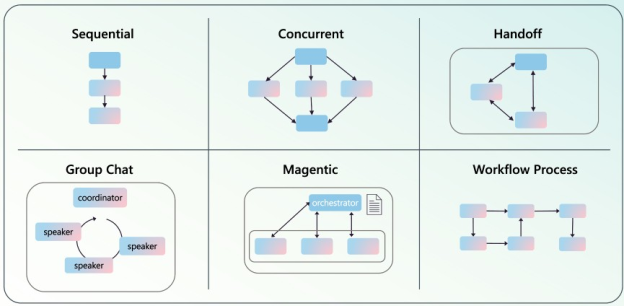
View all Workflow Orchestration Patterns here: Workflow patterns
Why Workflows? A Personal Perspective
I’ve worked with both Semantic Kernel and AutoGen, and I know how messy things can get when you try to connect agents without a plan.
Semantic Kernel is stable, but it’s not flexible. Connecting agents means writing a lot of custom code.
AutoGen gives you strong multi-agent patterns—agents can debate, reflect, and work together. But making it ready for production takes a lot of extra work.
Workflows in the Agent Framework build on what works and make it easier. You get:
- ✅ Explicit sequencing for predictable outcomes
- ✅ Conditional routing for dynamic decisions
- ✅ Nesting and checkpointing for resilience
- ✅ Concurrent execution for efficiency
- ✅ Human-in-the-loop for critical approvals
- ✅ Built-in observability with DevUI
Think of workflows as blueprints for orchestration—you plug in AI agents as building blocks, but you stay in control of the process.
Why Workflows Matter
Workflows give you control over how things run. You get:
- Explicit sequencing for predictable outcomes
- Conditional routing for dynamic decisions
- Nesting and checkpointing for resilience
- Concurrent execution for efficiency
Workflows are like blueprints—you can add agents as needed, but you always know what’s happening.
When to Use Workflows vs Single Agents
People often ask: when should I use a workflow instead of a single agent? Here’s my take:
| Scenario | Single Agent | Workflow |
| Simple Q&A | ✅ Use this | ❌ Overkill |
| Content with review cycle | ❌ Limited | ✅ Perfect |
| Multi-step data processing | ❌ Complex | ✅ Ideal |
| Parallel analysis tasks | ❌ Sequential | ✅ Concurrent |
| Conditional routing | ❌ Manual | ✅ Built-in |
| Human approvals needed | ❌ Difficult | ✅ Native |
| Reusable pipelines | ❌ Copy-paste | ✅ Composable |
My rule of thumb: If you’re writing lots of if/else code to connect agents, it’s time to use a workflow.
Workflow Patterns: From Simple to Complex
Here are the patterns I use most in real projects:
📐 Pattern 1 — Sequential Pipeline (Most Common)
This is the most common pattern. It’s great for content generation, data processing, and review workflows.


When to use: When each step depends on the last one.
Example: I used this for a docs pipeline—one agent gathers info, another writes, and a third reviews.
🔀 Pattern 2 — Concurrent Workflow (Fan-Out/Fan-In)
Use this when you want several agents to work at the same time on the same input:


When to use: When you have tasks that can run in parallel for speed.
Example: For a business proposal, one agent checks finances, another looks at market fit, and a third checks tech. All run at once, then you combine the results.
🧱 Pattern 3 — Workflow-as-Agent (Modularity FTW)
This is a powerful trick. You can wrap a whole workflow into a single agent using AddAgent():


SUPER_AGENT
When to use: When you want reusable pipelines or microservice-style agent setups.
Example: A “Content Creation Agent” that uses research, writing, and review steps inside—but outside systems just call it as one agent.
🌳 Pattern 4 — Branching Logic (Conditional Routing)
Sometimes, workflows need to make decisions:


When to use: For support tickets, document routing, or approval flows.
Example: In customer support, classify the query, then send it to billing, tech, or general support.
🤝 Pattern 5 — Handoff (Agent-to-Agent Transfer)
Sometimes, you need to pass work from one specialist to another:


When to use: For escalation paths or specialist handoffs.
Example: In IT support, L1 triages, L2 investigates, L3 resolves. The whole conversation moves along each step.
Why Workflows are Needed in the Microsoft Agent Framework
Earlier versions of the Foundry portal and framework had limited support for connecting agents. It was hard to build complex solutions because the tools didn’t let agents work together smoothly.
Connected Agents Deprecation
What Were Connected Agents?
Connected Agents was a feature in Azure AI Foundry (previously Azure AI Studio) that let you:
- Break down big tasks across specialized agents
- Route between agents using natural language
- Orchestrate agents in the portal without code
Limitations That Led to Deprecation
But there were some big limits:
- Max depth of 2: Subagents couldn’t have their own subagents.
- No local function calls: You had to use OpenAPI or Azure Functions.
- Citation issues: Citations from connected agents didn’t always work.
- Limited patterns: Only simple delegation, no complex workflows.


Official Deprecation Notice: Learn more
The new Microsoft Agent Framework fixes these problems with strong workflow features. Now you can:
- Simplify development: Workflows give you a clear structure, so it’s easier to build and manage agent tasks.
- Scale up: You can use sequential, concurrent, or conditional workflows for all kinds of solutions.
- Maintain easily: Workflows are modular, so you can update and maintain agent interactions without a headache.


Why Workflows Are Better


For more on workflows and how to use them, see the workflow section of my GitHub repo. You’ll find code samples and step-by-step guides there.
Practical Benefits:
- Governance: Policies and explicit routing reduce unpredictable behavior.
- Extensibility: Nested workflows and modular agents make reuse easier.
- Integration: Direct tool/function calls lower latency and simplify architectures.
- Observability: DevUI and checkpointing improve debugging and reliability.
Demo: Create a Sequential Workflow in Agent
Let’s start with the most common pattern—a simple pipeline with three agents.
You can find the full code and many more workflow samples in my GitHub repo:
🔗 My Agent Framework Journey Repo
This repo has hands-on examples for building, orchestrating, and deploying AI agents and multi-agent workflows using the Microsoft Agent Framework. If you want to see all the workflow patterns and code samples from this blog, check out the python/2.Workflow folder in the repo. It’s a great place to explore and try out these ideas yourself.
🎥 Workflow Demo Video
Watch Microsoft Agent Framework workflows in action as we demonstrate a live Research-Writer-Reviewer pipeline processing real content requests. See how agents coordinate seamlessly through sequential and concurrent execution patterns with built-in error handling and intelligent routing.
To know more about DevUI, click here

The Scenario
We’ll build a Content Pipeline that:
- Researches a topic
- Writes content based on the research
- Reviews the content for quality
Code Breakdown
Here’s what’s happening:
1. Agent Creation — The Foundation
researcher = ChatAgent(

    chat_client=client,

    name="ResearchAgent",

    instructions="You are a research specialist..."

)Each agent has a clear job, described in plain language. No complicated setup needed.
2. Workflow Construction — The Blueprint
workflow = Workflow()

workflow.add_agent(researcher)

workflow.add_agent(writer)

workflow.add_agent(reviewer)

You add agents to the workflow like building blocks.
3. Edge Definition — The Flow
workflow.add_edge("ResearchAgent", "WriterAgent")

workflow.add_edge("WriterAgent", "ReviewerAgent")Edges show how messages move between agents. Here, it’s Research → Write → Review.
4. Execution — The Magic
result = await workflow.run("Write a blog post about...")One call runs the whole pipeline. Each agent gets the output from the previous one.
Output
[ResearchAgent] Researching topic: AI agents in enterprise…
[WriterAgent] Creating content based on research…
[ReviewerAgent] Reviewing and polishing content…
Final Output:
# The Benefits of AI Agents in Enterprise
AI agents are transforming how enterprises operate…
[Full blog post content]
Visualizing Workflows with DevUI
One of my favorite features is seeing your workflow in action. With DevUI, you can actually visualize how your agents and workflows are connected and how data flows between them.
How to Visualize Your Workflow/Agents:
- When you run your workflow code, DevUI can show you a live, interactive graph of all the agents, steps, and message flows.
- You’ll see each agent as a node and the connections as edges, making it easy to understand and debug your setup.
- This is super helpful for spotting bottlenecks, understanding the sequence, and making sure your workflow is working as expected.
What You Need:
- Make sure you have DevUI enabled in your environment. Usually, this means installing the right packages and running your workflow in development mode.
- You might need to set some environment variables or use a specific command to launch DevUI. For details, check my earlier blog on setting up the development UI for debugging and visualization.
- Your workflow code should use the Agent Framework’s workflow classes and methods, as shown in the examples above.

Next Steps: Use DevUI for Workflow Development
- Once DevUI is running, you can use it to trace, debug, and optimize your workflow as you build it.
- You’ll be able to see real-time updates as agents process messages, and you can step through the workflow to see exactly what’s happening at each stage.
- This makes development much faster and helps you catch issues early.
Coming Up Next:
- In my next blog, I’ll show you how to create workflows directly from the Foundry portal using only configuration settings—no code required. This will make it even easier to design and deploy agent workflows for your projects.
More Examples
You can find more examples in the official repo:
🔗 microsoft/agent-framework: A framework for building, orchestrating and deploying AI agents and multi-agent workflows.
- Getting Started with Agents: basic agent creation and tool usage
- Chat Client Examples: direct chat client usage patterns
- Getting Started with Workflows: basic workflow creation and integration
You can also check my repo for hands-on samples:🔗 My Agent Framework Journey Repo
Conclusion
Workflows are the natural evolution of single-agent development.
Microsoft Agent Framework Workflows bring together the best of both worlds:
- The stability of Semantic Kernel
- The orchestration power of AutoGen
- Enterprise-grade reliability and observability
They turn AI development from a struggle with infrastructure into a creative process. We’ve seen how:
- Sequential pipelines handle step-by-step work
- Concurrent workflows let agents work in parallel
- Conditional routing sends queries to the right specialist
- Handoff patterns keep context as work moves between agents
The real breakthrough isn’t just the technology—it’s the new way of thinking.
When connecting agents is as easy as drawing a graph, you stop worrying about “How do I connect these agents?” and start thinking, “What big problems can I solve now?”
Going from your first agent to your first workflow is a big step. From here, the Agent Framework lets you build enterprise AI, complex orchestration, and production-ready agent systems.
What’s Next?
In this post, I covered the basics of workflows, their key features, why they matter, and the most useful patterns. You saw step-by-step Python code to help you get started, and learned how to visualize and debug your workflows using DevUI.
But this is just the beginning! In the next blog, I’ll show you how to create and manage workflows directly from the new Microsoft Foundry portal—using only configuration settings, no code required. You’ll see how easy it is to design, deploy, and publish agent workflows for your projects, all from a simple web interface.
If you want to get a head start, check out my GitHub repo for more hands-on samples and workflow templates. And if you have questions or want to see a specific use case, let me know!
Stay tuned for the next post—there’s a lot more to explore!
What Do You Think?
I’d love to hear from you:
- 💬 What workflow patterns are you most interested in?
- 🎯 What use cases should I cover next?
- 🛠️ Have you run into any challenges building multi-agent systems?
Drop a comment or reach out on LinkedIn—let’s learn together! 🚀
Related Resources
Here are some helpful links if you want to learn more or dive deeper:
- Agent Framework Documentation: https://learn.microsoft.com/en-us/agent-framework/
- Agent Framework GitHub: https://github.com/microsoft/agents
- AI Agents for Beginners: https://github.com/microsoft/ai-agents-for-beginners
- Foundry Agent Service: https://learn.microsoft.com/en-us/azure/ai-foundry/agents/
- My Previous Blog: https://singhrajeev.com
#AgenticAI #MicrosoftAgentFramework #Workflows #MultiAgentSystems #AIOrchestration #AzureAI #DevUI #EnterpriseAI