
In the previous post, I delved into multi-agent applications, highlighting how complex tasks can benefit from multi-agent solutions and the challenges they present. We also explored the capabilities of the Semantic Kernel. For more details, check out this article: Unlock the Power of AI: Creating Your First AI Agent Using Semantic Kernel
In this article, we’ll focus on getting started with the AutoGen framework. We’ll cover the basics, provide step-by-step instructions, and discuss how AutoGen can streamline the development of multi-agent systems. By the end, you’ll have a solid foundation to build your own multi-agent applications using AutoGen.
Multi-agent orchestration frameworks
To get started with AutoGen, let’s first recap the Orchestration Framework, its necessity, and other relevant details.
Refer to my previous post Unlock the Power of AI: Creating Your First AI Agent Using Semantic Kernel to understand what an AI Agent is, what Multi-Agent systems are, and how to get started with Azure AI Agent services.
Once you review that, you’ll grasp the need for an Orchestration layer and how Azure AI Agent Service integrates seamlessly with multi-agent orchestration frameworks compatible with the Assistants API, such as AutoGen and Semantic Kernel.
It’s recommended to start by building reliable and secure singleton agents with Azure AI Agent Service. Then, orchestrate these agents using AutoGen, which evolves to find optimal collaboration patterns. Features that prove valuable in production with AutoGen can be transitioned to Semantic Kernel for stable, production-ready support.
Now, let’s shift our focus to AutoGen, a framework crafted to identify optimal collaboration patterns and stimulate ideation.

What is AutoGen?
AutoGen is an advanced framework designed for creating multi-agent AI applications that can operate autonomously or in collaboration with humans. This innovative tool simplifies the development of complex multi-agent conversation systems through two main steps:
- Defining Agents: Users can specify a set of agents, each with specialized capabilities and roles tailored to specific tasks.
- Interaction Behavior: Users can define how these agents interact with one another, determining the appropriate responses when an agent receives messages from another.
These steps are both intuitive and modular, allowing for the reuse and composition of agents across different applications.
Code Generation, Execution, and Debugging:
For instance, in building a system for code-based question answering, one can design agents and their interactions as illustrated in the image below.

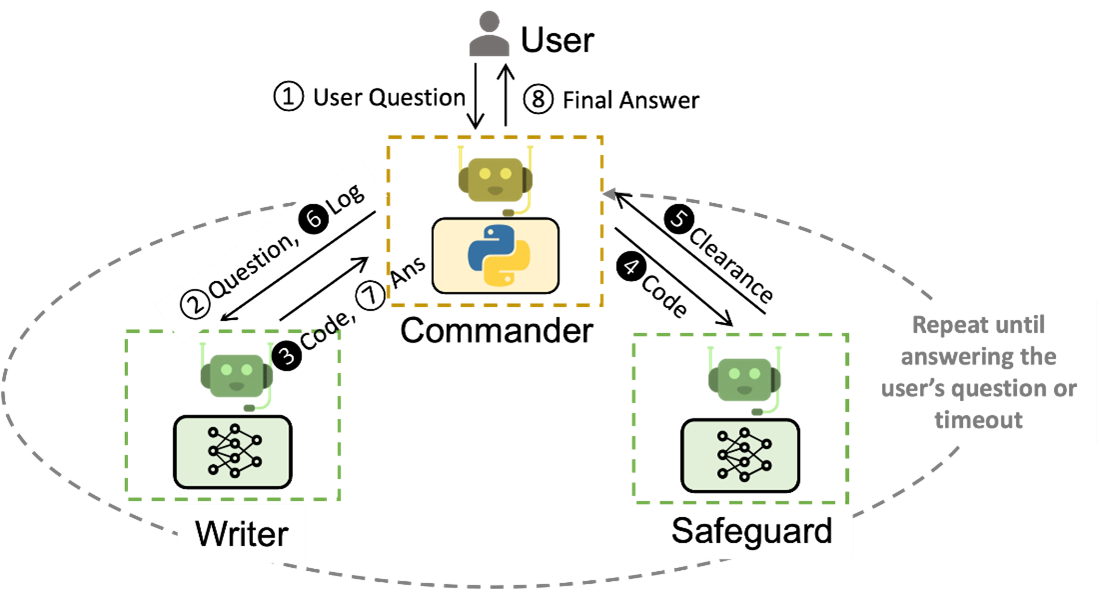
Example Workflow
The above image demonstrates a workflow addressing code-based question answering within supply-chain optimization:
- Commander: Receives user questions and coordinates with other agents.
- Writer: Crafts the necessary code and provides interpretations.
- Safeguard: Ensures safety protocols are followed before execution.
The process involves multiple interactions:
- The user submits a question to the Commander.
- The Commander logs the question and forwards it to the Writer.
- The Writer generates code based on the question.
- The Safeguard reviews the code for safety clearance.
- Upon clearance, the Commander executes the code and provides an answer to the user.
This cycle repeats until a satisfactory answer is provided or a timeout occurs.
Benefits
Using AutoGen significantly reduces manual interactions—by up to 10 times—and coding effort by more than fourfold in applications such as supply-chain optimization.
By leveraging AutoGen, developers can efficiently build sophisticated AI systems that enhance productivity while ensuring safety and reliability in their operations.
To explore more on what is AutoGen, refer AutoGen: Enabling Next-Gen LLM Applications via Multi-Agent Conversation – Microsoft Research
AutoGen: Enabling next-generation large language model applications – Microsoft Research
Use Case using AutoGen
| Category | Description | Benefits | AutoGen Components |
| Code Generation, Execution, and Debugging | Automates the process of generating, executing, and debugging code. Examples include automated task solving with code generation and question answering with retrieval augmented agents. | – Efficiency: Speeds up the coding process. – Accuracy: Reduces errors in code. – Productivity: Allows developers to focus on higher-level tasks. | – AssistantAgent: Assists in code generation and debugging. – ProxyAgent: Facilitates communication between agents. |
| Multi-Agent Collaboration (>3 Agents) | Involves multiple agents working together to solve complex tasks. Examples include automated task solving by group chat and automated data visualization by group chat. | – Collaboration: Enhances teamwork among agents. – Scalability: Handles more complex tasks. – Flexibility: Adapts to various problem-solving scenarios. | – ManagerAgent: Oversees the collaboration of multiple agents. – GroupMemberAgent: Participates in group tasks. |
| Sequential Multi-Agent Chats | Agents solve multiple tasks in a sequence of chats. Examples include solving multiple tasks initiated by a single agent or different agents. | – Organization: Manages tasks in a structured sequence. – Efficiency: Streamlines task completion. – Coordination: Ensures smooth transitions between tasks. | – SequenceAgent: Manages the sequence of tasks. – TaskAgent: Handles individual tasks within the sequence. |
| Nested Chats | Agents engage in nested conversations to solve complex tasks. Examples include solving complex tasks with nested chats and supply chain optimization with nested chats. | – Depth: Allows for detailed problem-solving. – Complexity: Handles intricate tasks. – Thoroughness: Ensures comprehensive solutions. | – NestedAgent: Manages nested conversations. – OptimizationAgent: Focuses on optimizing solutions. |
| Applications | Real-world applications of AutoGen, such as continual learning from new data and supply chain optimization. | – Practicality: Applies AI to real-world problems. – Innovation: Encourages creative solutions. – Impact: Demonstrates tangible benefits. | – ApplicationAgent: Applies AI to specific real-world problems. – LearningAgent: Continuously learns from new data. |
| Tool Use | Utilizes various tools to enhance agent capabilities. Examples include web search, SQL query generation, and web scraping. | – Versatility: Expands agent functionality. – Resourcefulness: Leverages external tools. – Capability: Enhances problem-solving abilities. | – ToolAgent: Uses external tools to enhance capabilities. – FunctionAgent: Executes specific functions. |
| Human Involvement | Involves human users in the agent workflow. Examples include auto code generation with human feedback and task solving with multiple human users. | – Collaboration: Integrates human expertise. – Feedback: Improves agent performance. – Adaptability: Adjusts to human input. | – HumanAgent: Interfaces with human users. – FeedbackAgent: Incorporates human feedback. |
| Agent Teaching and Learning | Teaches agents new skills and knowledge. Examples include teaching agents new facts and training agents in an agentic way. | – Learning: Enhances agent capabilities. – Reuse: Applies learned skills to new tasks. – Improvement: Continuously upgrades agent performance. | – TeachingAgent: Teaches new skills to agents. – LearningAgent: Learns new facts and skills. |
| Multi-Agent Chat with OpenAI Assistants | Integrates OpenAI assistants into multi-agent chats. Examples include chat with OpenAI assistant using function call and retrieval augmentation. | – Integration: Combines OpenAI capabilities with AutoGen. – Enhancement: Boosts agent performance. – Innovation: Leverages advanced AI models. | – OpenAIAgent: Integrates OpenAI capabilities. – FunctionCallAgent: Manages function calls with OpenAI. |
| Non-OpenAI Models | Utilizes non-OpenAI models for specific tasks. Examples include conversational chess using non-OpenAI models. | – Diversity: Incorporates various AI models. – Flexibility: Adapts to different AI technologies. – Customization: Tailors solutions to specific needs. | – NonOpenAIAgent: Utilizes non-OpenAI models. – ChessAgent: Manages chess conversations. |
| Multimodal Agent | Engages in multimodal interactions, combining text, images, and other media. Examples include multimodal agent chat with DALLE and GPT-4V. | – Richness: Enhances communication with multiple modalities. – Engagement: Improves user interaction. – Versatility: Handles diverse input types. | – MultimodalAgent: Manages multimodal interactions. – ImageAgent: Handles image-related tasks. |
| Long Context Handling | Manages long conversations and context. Examples include long context handling as a capability. | – Continuity: Maintains context over extended interactions. – Coherence: Ensures logical flow. – Memory: Retains important information. | – ContextAgent: Manages long context interactions. – MemoryAgent: Retains and recalls information. |
| Evaluation and Assessment | Assesses the utility of LLM-powered applications. Examples include AgentEval for multi-agent system assessment. | – Quality: Evaluates agent performance. – Improvement: Identifies areas for enhancement. – Validation: Ensures reliability. | – EvaluationAgent: Assesses agent performance. – AssessmentAgent: Identifies areas for improvement. |
Diverse Applications Built with AutoGen
The figure below showcases six different applications developed using AutoGen.

Link for all the examples: Examples
Example Use Case: Enhanced ChatGPT with Code Interpreter and Plugins
One straightforward way to utilize AutoGen’s built-in agents is by setting up automated chats between an assistant agent and a user proxy agent. This setup can be used to build an enhanced version of ChatGPT that includes not only conversational abilities but also code interpretation and execution capabilities. This system can be customized to various degrees of automation and embedded into larger frameworks.
Benefits
Using AutoGen for this purpose offers several benefits:
- Customization: Allows for a customizable degree of automation, making it suitable for various environments and systems.
- Personalization: Supports diverse application scenarios by adding personalization and adaptability based on past interactions.
- Efficiency: Automates interactions between agents, reducing the need for manual intervention while allowing human feedback when necessary.
AutoGen Components
The components used in this example include:
- Assistant Agent: Acts as an AI assistant, similar to Bing Chat, capable of interpreting and executing code.
- User Proxy Agent: Simulates user behavior, such as code execution, and engages humans when necessary.
Example Workflow
- User Proxy Agent: Requests to plot a chart of META and TESLA stock price changes year-to-date (YTD).
- Assistant Agent: Attempts to execute the code but encounters an error due to a missing package.
- Assistant Agent: Prompts for the installation of the required package (yfinance), successfully installs it, and executes the code.
- Output: Two charts are generated, one depicting stock prices over months and another showing percentage change.
Benefits
- Customization: Allows for a customizable degree of automation, making it suitable for various environments and systems.
- Personalization: Supports diverse application scenarios by adding personalization and adaptability based on past interactions.
- Efficiency: Automates interactions between agents, reducing the need for manual intervention while allowing human feedback when necessary.

AutoGen Benefits
Based on the overview of the use case, we can summarize the benefits of AutoGen as follows. These benefits will become clear once you see the demo and how AutoGen helps achieve them:
- Conversational Programming: Allows defining agents and getting them to collaborate through conversation.
- Autonomous Workflows: Provides robust support for autonomous and semi-autonomous workflows, extending beyond traditional chains of LLM agents.
- Support for Human Input Mode: Offers first-class support for human intervention and feedback within agent conversations.
- Code-First Approach to Agent Action: Emphasizes generating and executing code, including the ability for agents to call pre-registered functions or write code that is subsequently executed.
These features make AutoGen a powerful tool for building advanced AI applications, enhancing both functionality and user experience.
Understanding AutoGen Framework key concepts
A good way to start your AutoGen journey is to refer to this link: AutoGen GitHub
AutoGen framework

AutoGen Framework Overview
The AutoGen framework features a layered architecture with clearly defined responsibilities across the framework, developer tools, and applications. It comprises three main layers: core, agent chat, and first-party extensions.
Layers of AutoGen
- Core: This layer provides the foundational building blocks for an event-driven agentic system.
- AgentChat: A task-driven, high-level API built on the core layer, featuring group chat, code execution, pre-built agents, and more.
- Extensions: Implementations of core interfaces and third-party integrations, such as the Azure code executor and OpenAI model client.
Core API and AgentChat
Agent Definition
At its core, AutoGen provides a base ConversableAgent class, which uses conversations as the format for agent communication. Key parameters for the ConversableAgent class include:
- system_message: A system message useful for steering core agent behaviors.
- isterminationmsg: A function to determine if a message terminates the conversation.
- maxconsecutiveauto_reply: The maximum number of consecutive auto replies.
- humaninputmode: Determines when to request human input (e.g., always, never, or just before a task terminates).
- function_map: Maps names to callable functions, wrapping the OpenAI tool calling functionality.
- codeexecutionconfig: Configuration for code execution.
- llm_config: Configuration for LLM-based auto reply.
AutoGen also provides other convenience classes with slightly different parameters.
UserProxyAgent
The UserProxyAgent is a subclass of ConversableAgent configured with:
- humaninputmode: Set to ALWAYS, prompting for human input every time a message is received.
- llm_config: Set to False, meaning it will not attempt to generate an LLM-based response.
- Code Execution: Enabled by default, allowing the agent to execute code contained in messages it receives, mirroring what an actual user might do when they receive suggested code generated by an LLM.
AssistantAgent
The AssistantAgent is a subclass of ConversableAgent configured with:
- Default System Message: Designed to solve a task with an LLM, including suggesting Python code blocks and debugging.
- humaninputmode: Set by default to NEVER.
GroupChat
GroupChat is an abstraction that enables groups of ConversableAgents to collaborate on a task, with mechanisms to orchestrate their interactions (e.g., determining which agent speaks/acts next, max rounds in a conversation). GroupChat is wrapped by a GroupChatManager object, which inherits from the ConversableAgent class.
- GroupChat: A container class for specifying properties of the group chat, such as a list of agents and the speaker selection method.
- GroupChatManager: This class inherits from the ConversableAgent class with some differences. It takes an additional GroupChat parameter and modifies its behavior. Specifically, when it receives a message, it broadcasts it to all agents, selects the next speaker based on the group chat policy, enables a turn for the selected speaker, and checks for termination conditions until some termination condition is met.
By understanding these components, you can effectively leverage AutoGen to build sophisticated AI applications. This framework allows for the creation of automated systems that are both powerful and user-friendly, enhancing overall functionality and user experience.
We saw various use case in above section and discussed about one Enhanced ChatGPT with Code Interpreter and Plugins. Now, lets understand one more use case using Multi-agent Conversation Framework.
Multi-agent Conversation Framework
AutoGen offers a framework for multi-agent conversations, making it easy to use foundation models. It includes agents that can talk to each other, use tools, and interact with humans. By automating these chats, tasks can be done on their own or with human help, even those needing code.
This framework makes it easier to manage orchestration, automation and improve complex workflows with LLMs. It boosts their performance and fixes their weaknesses, allowing for the creation of advanced LLM applications with little effort.
Agents
AutoGen includes agents designed to solve tasks by talking to each other. These agents have two main features:
- Conversable: Agents in AutoGen are conversable, which means that any agent can send and receive messages from other agents to initiate or continue a conversation
- Customizable: Agents in AutoGen can be customized to integrate LLMs, humans, tools, or a combination of them.
The figure below shows the built-in agents in AutoGen.

AutoGen framework has versatile ConversableAgent class for agents that can communicate with each other through messages to complete tasks collaboratively. Here are the key features and details:
Key Features:
- Conversable Agents:
- Agents can exchange messages and perform actions based on received messages.
- Different agents may act differently after receiving messages.
- The auto-reply capability of Conversable Agents allows for more autonomous multi-agent communication while retaining the possibility of human intervention.
- AssistantAgent:
- Acts as an AI assistant using large language models (LLMs) like GPT-4.
- Can write Python code for users to execute when it receives a task description.
- Processes execution results and suggests corrections or bug fixes.
- Behavior can be customized via system messages.
- LLM inference configuration is adjustable through [llm_config].
- UserProxyAgent:
- Serves as a proxy for humans, requesting human input by default.
- Capable of executing code and using tools.
- Automatically runs code when it detects an executable code block in the received message if no human input is provided.
- Code execution can be disabled using the code_execution_config parameter.
- LLM-based responses are off by default but can be enabled by configuring llm_config with appropriate inference settings.
Refer to this link for more details-> Multi-agent Conversation Framework
A Basic Two-Agent Conversation Example
Once the participating agents are constructed properly, one can start a multi-agent conversation session by an initialization step. (user_proxy.initiate_chat ())
After the initialization step, the conversation could proceed automatically. Find a visual illustration of how the user_proxy and assistant collaboratively solve the above task autonomously below:

- The assistant receives a message from the user_proxy, which contains the task description.
- The assistant then tries to write Python code to solve the task and sends the response to the user_proxy.
- Once the user_proxy receives a response from the assistant, it tries to reply by either soliciting human input or preparing an automatically generated reply. If no human input is provided, the user_proxy executes the code and uses the result as the auto-reply.
- The assistant then generates a further response for the user_proxy. The user_proxy can then decide whether to terminate the conversation. If not, steps 3 and 4 are repeated.
Developing AI Agents using AutoGen Framework:
https://microsoft.github.io/autogen/stable
The ecosystem also supports two essential developer tools:
- AutoGen Studio provides a no-code GUI for building multi-agent applications.
- AutoGen Bench provides a benchmarking suite for evaluating agent performance.

Magentic-One — AutoGen
Magentic-One is a generalist multi-agent system for solving open-ended web and file-based tasks across a variety of domains. It represents a significant step forward for multi-agent systems, achieving competitive performance on a number of agentic benchmarks
AutoGen Studio — AutoGen
AutoGen Studio is a low-code interface built to help you rapidly prototype AI agents, enhance them with tools, compose them into teams and interact with them to accomplish tasks. It is built on AutoGen AgentChat – a high-level API for building multi-agent applications.
Note: AutoGen Studio is meant to help you rapidly prototype multi-agent workflows and demonstrate an example of end user interfaces built with AutoGen. It is not meant to be a production-ready app.
Exploring AutoGen Studio
Watch the video: Discover what you can achieve with AutoGen Studio. Video-AutoGen
Demo: Set up AutoGen Studio and Configure your first AI Agent
The current stable version is v0.4 and I am using this version for the demo.
Install AutoGen Studio for no-code GUI
With Python 3.10 or newer active in your virtual environment, use pip to install AutoGen Studio:
pip install -U "autogenstudio"

autogenstudio ui --port 8081When you run the command autogenstudio ui –port 8081, it starts the AutoGen Studio user interface on port 8081. This allows you to access the AutoGen Studio UI through your web browser by navigating to http://localhost:8081 or http://<your-ip-address>:8081
You see the screen below:

Capabilities – What Can You Do with AutoGen Studio?
AutoGen Studio offers four main interfaces to help you build and manage multi-agent systems:
- Team Builder
- A visual interface for creating agent teams through declarative specification (JSON) or drag-and-drop
- Supports configuration of all core components: teams, agents, tools, models, and termination conditions
- Fully compatible with AgentChat’s component definitions
- Playground
- Interactive environment for testing and running agent teams
- Features include:
- Live message streaming between agents
- Visual representation of message flow through a control transition graph
- Interactive sessions with teams using UserProxyAgent
- Full run control with the ability to pause or stop execution
- Gallery
- Central hub for discovering and importing community-created components
- Enables easy integration of third-party components
- Deployment
- Export and run teams in python code
- Setup and test endpoints based on team configuration
- Run teams in a docker container
Prerequisites: OpenAI Configuration Details
To get started, you’ll need to set up an OpenAI account and generate an OpenAI Key.
Sign in here Overview – OpenAI API

For all the AutoGen components, configure the OpenAI key and base url as https://api.openai.com
Creating your First Agent workflow in AutoGen, using AutoGen Studio
To get started, you can either create a new team or choose a template from the Gallery. I opted for the “Web Agent Team (Operator)” template. This template includes the following components:
- A Team
- MultiModel Web Surfer
- AssistantAgent
- UserProxy Agent

Steps:
Select the Web Agent Team and click on edit button as highlight below.

Click on Model client.

Configure and update the details below.

Similarly you need to make updates for MultimodalWebSurfer and AssistantAgent.
Running the Program:
Scenario 1:
Once, these changes are done, save and click on Test Team.
You will see below progress.

Flow of the Multi-Agent.

During this time, I (user didn’t give any second prompt).
Scenario 2:
Now, let’s explore another scenario where websurferAgent doesn’t work (due to an error) and how does this assistant come into the play.
See below, User provided the prompt and websurferAgent encountered an error.

And during this time, user_proxy asked for an input from user. I entered here, try again.
And after second attempt 2, same error and this time AssistantAgent answers the question.

The flow looks like below, changed from Scenario1.

Watch this video for setting up AutoGen Studio and Configuration.
Flow Explanation
- Initialization:
- I am using using the AutoGen framework with a template named “Web Agent Team” which includes the MultimodalWebSurfer, AssistantAgent, and UserProxyAgent.
- The system is running on your local machine at http://127.0.0.1:8081/
- Input Prompt:
- AutoGen prompts you for input and you enter a question here.
- WebSurfer Agent:
- The input is first directed to the MultimodalWebSurfer agent.
- The MultimodalWebSurfer agent attempts to perform web surfing tasks to gather information from the web.
- If the WebSurfer agent encounters an error (e.g., connection issues, missing browser executables), it fails to complete the task.
- User Proxy Agent:
- When the WebSurfer agent fails, the UserProxyAgent steps in and prompts you for a suggestion or alternative action.
- You respond with “try again,” and the system retries the task up to three times.
- Assistant Agent:
- After three unsuccessful attempts by the WebSurfer agent, the task is passed to the AssistantAgent.
- The AssistantAgent uses the OpenAIChatCompletionClient (configured with the GPT-4 model) to generate a response based on the input.
- The AssistantAgent interacts with the language model (LLM) to process the task and provide a response.
- Response Delivery:
- The response generated by the AssistantAgent is then delivered back to you.
This flow ensures that the system attempts to gather information from the web first and falls back to the language model if web surfing fails. It also incorporates user feedback through the UserProxyAgent to handle errors and retries.
Take aways
Using AutoGen in this scenario offers several advantages:
- Modularity: AutoGen allows you to create and manage multiple agents with specific roles. In my case, I have a MultimodalWebSurfer for web searches, an AssistantAgent for general tasks, and a UserProxyAgent for handling retries and user feedback. This modular approach makes it easier to manage and extend the system.
- Fallback Mechanism: The system is designed to handle failures gracefully. If the WebSurfer agent encounters an error, the UserProxyAgent prompts for user input and retries the task. If retries fail, the task is passed to the AssistantAgent, ensuring that the user still receives a response.
- User Interaction: The UserProxyAgent allows for interactive user feedback, making the system more robust and user-friendly. Users can provide suggestions or alternative actions when an error occurs, improving the overall experience.
- Asynchronous Processing: AutoGen leverages asynchronous processing, allowing the system to handle multiple tasks concurrently. This improves the efficiency and responsiveness of the application.
- Integration with LLMs: The AssistantAgent uses the OpenAI GPT-4 model to generate intelligent responses. This integration with advanced language models enhances the system’s ability to understand and respond to complex queries.
- Scalability: The modular design and use of group chat mechanisms like RoundRobinGroupChat make it easy to scale the system by adding more agents or adjusting the configuration to handle higher loads.
- Customizability: AutoGen provides flexibility in defining custom agents and tools. You can tailor the agents to specific tasks or domains, making the system adaptable to various use cases.
- Error Handling: The system’s ability to handle errors and retries ensures that it remains functional even when some components fail. This improves the reliability and robustness of the application.
Overall, AutoGen provides a structured and efficient way to build and manage intelligent agents, enhancing the user experience and ensuring reliable performance. If you have any more questions or need further assistance, feel free to ask!
Conclusion
AutoGen is a powerful framework that simplifies the creation of multi-agent AI applications, making it easier to build complex systems with reduced manual effort and coding. Its support for autonomous workflows, human input, and a code-first approach makes it a valuable tool for developers looking to leverage the capabilities of AI agents.
That’s all for today!
Thank you for reading and exploring the capabilities of AutoGen with me.
Stay tuned for more updates and insights on the latest in Gen AI and technology.
Happy exploring AutoGen!
What’s Next?
- Explore the AutoGen documentation to learn more about AutoGen
- Start building your agents today in AutoGen Studio
- Visit Microsoft Research Blogs on AutoGen Introducing AutoGen Studio: A low-code interface for building multi-agent workflows – Microsoft Research
We can’t wait to see how you’ll leverage AutoGen to discover the best collaboration patterns and spark new ideas for building multi-agent systems.
[…] my previous post, “Getting Started with AutoGen – A Framework for Building Multi-Agent,” I delved into the basics of the AutoGen Framework, providing step-by-step instructions and […]