
Integration plays a vital role in connecting applications, data, services, and devices within organizations. In today’s digital landscape, effective integration is essential for businesses seeking to stay competitive and drive growth.
Connections can run between on-premises, cloud, and edge systems.
Azure offers a wide range of integration tools and capabilities to facilitate seamless communication and data flow between different systems and applications. These services, including Logic Apps, Service Bus, Event Grid, Azure Function, Azure Relay, Hybrid connectors, and On-premises data gateway, provide powerful solutions for various integration scenarios in the Azure ecosystem.
In this blog, we have explored the fundamental concepts of integration patterns, highlighted the key services offered by Microsoft Azure for integration, and provided a comprehensive guide to hybrid connectivity.
What is System Integration?
System Integration refers to the process by which multiple individual subsystems or sub-components are combined into one all-encompassing larger system thereby allowing the subsystems to function together.
System integration connects the organization with third parties such as suppliers, customers, and shareholders. Each of which has their own unique interests in information generated by your company
What are the 3 types of system integration?
Given the zone of utilization and sort of utilization, integration administrations can be separated into three classifications:
- Enterprise Application Integration (EAI)
- Data Integration (DI)
- Electronic Document Integration/Interchange (EDI)
What is an integration pattern?
Enterprise integration patterns (EIP) are a set of concepts and practices on how to best configure integrations between systems, applications, or data, often collectively referred to as enterprise application integration (EAI)
Enterprise Application Integration (EAI)
Enterprise Application Integration is a help-based integration. It’s an interaction that speaks with various administrations, assembles information, and afterward continues with additional means dependent on wanted activity or a work process. The cycle can be set off with uncovered help.
Data Integration (DI)
Various information bases and administrations for the board announcing or any child of revealing. Get together information from all city benefits, amassing and changing them into focal spots for intuitive announcing.
At the point when you need to merge your administrations into one main issue of access, you need information integration. For the most part, there are loads of various information sources (or data sets) and you need them in one spot of access, all merged.
Electronic Document Integration/Interchange (EDI)
EDI (Electronic Document Integration/Interchange) is a central business to business situated interaction. Its capacities are for the paperless trade of reports and electronic regulations.
Integration Pattern category:
We can broadly divide these patterns in below 2 categories:
- Network-Based Options: Network-based options require setting up Vnet and planning for P2S, S2S, or ExpressRoute.
- Non-Network Based Options: This option is different from the network-level integration technologies such as VPN. These services, enable you to securely expose services that run in your corporate network to the public cloud. You can do so without opening a port on your firewall or making intrusive changes to your corporate network infrastructure.
Network-Based Options
When we talk about a network-based solution, we have below options.
Point-to-site virtual private network (VPN):
- Established between a single PC connected to your network and the VNet.
- Uses the SSTP protocol to provide encrypted communication over the Internet between the PC and the VNet.
- The latency for a point-to-site VPN is less predictable since the traffic traverses the Internet.
Site-to-site VPN:
- Established between your VPN device and an Azure VPN Gateway.
- Connection is an IPSec/IKE VPN that provides encrypted communication over the Internet between your on-premises device and the Azure VPN gateway.
- The latency for a site-to-site connection is less predictable since the traffic traverses the Internet.
Azure ExpressRoute:
- Established between your network and Azure, through an ExpressRoute partner.
- This connection is private. Traffic does not traverse the Internet.

VNET Integration for Web / Mobile Apps
- VNET Integration only works with apps in a Standard or Premium pricing plan.
- If your target virtual network already exists, it must have point-to-site VPN enabled with a Dynamic routing gateway before it can be connected to an app. Does not support Static routing.
- The VNET must be in the same subscription as your App Service Plan (ASP).
- The apps that integrate with a VNET will use the DNS that is specified for that VNET.
- By default, your integrating apps will only route traffic into your VNET based on the routes that are defined in your VNET.

VNET with API Management
- An added layer of security
- All the benefits of APIM
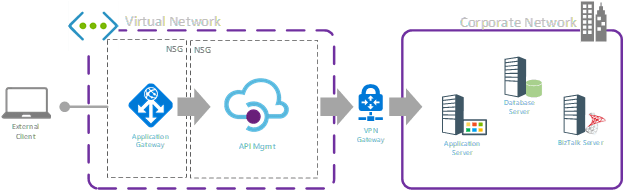
Non-Network Based Options
The Azure Relay service enables you to securely expose services that run in your corporate network to the public cloud. You can do so without opening a port on your firewall or making intrusive changes to your corporate network infrastructure.
The relay service supports the following scenarios between on-premises services and applications running in the cloud or in another on-premises environment.
- Traditional one-way, request/response, and peer-to-peer communication
- Event distribution at internet-scope to enable publish/subscribe scenarios.
- Bi-directional and unbuffered socket communication across network boundaries
Azure Relay differs from network-level integration technologies such as VPN. An Azure relay can be scoped to a single application endpoint on a single machine. The VPN technology is far more intrusive, as it relies on altering the network environment.
Relay – An Alternative Approach
Azure Relay has two features:
- Hybrid Connections – Uses the open standard web sockets enabling multi-platform scenarios.
- WCF Relays – Uses Windows Communication Foundation (WCF) to enable remote procedure calls. WCF Relay is the legacy relay offering that many customers already use with their WCF programming models.
Why the Relay?
- Getting out of your corporate network is usually easy.
- Getting in is typically very difficult!

How does Relay Work?
Concepts:
Secured listener endpoint in the cloud.
Opened via an outbound connection from within the corporate network.
Clients send messages via the listener’s endpoint.
No changes to the corporate firewall or network are required.
As long as it allows outbound traffic on port 80/443.

WCF Relay – How It Works
- WCF Relay point within a Service Bus namespace
- Outbound connection from an on-prem WCF service
- Uses WCF relay bindings:
- NetTcpRelayBinding
- BasicHttpRelayBinding
- WS2007HttpRelayBinding
- NetOnewayRelayBinding
- NetEventRelayBinding
- WebHttpRelayBinding
- NetMessagingBinding
- Security via Shared Access Signatures (SAS)
- Accessible from a variety of services & locations

WCF Relay – Constraints
- Needs a self-provided listener service.
- Relies on the Windows / .NET framework.
- Optimized for XML messaging.
Azure Relay Hybrid Connections
Azure Relay is one of the key capability pillars of the Azure Service Bus platform. The new Hybrid Connections capability of Relay is a secure, open-protocol evolution based on HTTP and WebSocket’s.
It supersedes the former, equally named BizTalk Services feature that was built on a proprietary protocol foundation. The integration of Hybrid Connections into Azure App Services will continue to function as-is.
Hybrid Connections enables bi-directional, request-response, and binary stream communication and simple datagram flow between two networked applications. Either or both parties can be behind NATs or firewalls.

Hybrid Connections – How It Works
Hybrid Connections requires a relay agent to be deployed where it can reach both the desired endpoint as well as to Azure. The relay agent, Hybrid Connection Manager (HCM), calls out to Azure Relay over port 443.
From the web app site, the App Service infrastructure also connects to Azure Relay on your application’s behalf. Through the joined connections, your app is able to access the desired endpoint. The connection uses TLS 1.2 for security and shared access signature (SAS) keys for authentication and authorization.

When your app makes a DNS request that matches a configured Hybrid Connection endpoint, the outbound TCP traffic will be redirected through the Hybrid Connection.
Benefits:
- Apps can access on-premises systems and services securely.
- The feature doesn’t require an internet-accessible endpoint.
- It’s quick and easy to set up. No gateways are required.
- Each Hybrid Connection matches to a single host: port combination, helpful for security.
- It normally doesn’t require firewall holes. The connections are all outbound over standard web ports.
- Because the feature is network level, it’s agnostic to the language used by your app and the technology used by the endpoint.
- It can be used to provide access to multiple networks from a single app.
- It’s supported in GA for Windows apps and Linux apps. It isn’t supported by Windows custom containers.
Azure Relay Hybrid Connections Constraints:
Things you cannot do with Hybrid Connections include:
- Mount a drive.
- Use UDP.
- Access TCP-based services that use dynamic ports, such as FTP Passive Mode or Extended Passive Mode.
- Support LDAP, because it can require UDP.
- Support Active Directory, because you cannot domain join an App Service worker.
Which Azure Relay to Use?

On-Premises Data Gateway
The on-premises data gateway acts as a bridge. It provides quick and secure data transfer between on-premises data, which is data that isn’t in the cloud, and several Microsoft cloud services. These services include Power BI, Power Apps, Power Automate, Azure Analysis Services, and Azure Logic Apps.
By using a gateway, organizations can keep databases and other data sources on their on-premises networks while securely using that on-premises data in cloud services.
On-Premises Data Gateway – How It Works
- Download and install the gateway on-premises.
- Create and associate a data gateway in Azure.
- Connect Logic App / Power App / etc to the gateway.
- Can run over ExpressRoute.

On-Premises Data Gateway – Constraints
- Logic Apps, Power Apps, and Power Automate support both read and write operations through the gateway:
- The gateway has a 2-MB payload limit for write operations.
- The gateway has a 2-MB request limit and an 8-MB compressed data response limit for read operations.
- URL for the GET request has a 2048-character limit.
- While using the gateway with Power BI in Direct Query Mode, there’s a 16-MB uncompressed data response limit.
Scenarios
Now, it’s time to investigate different scenarios, and when to use which Services.
Scenario 1: Azure Web/Mobile App to On-Prem
Primary Solution: Azure Relay Hybrid Connections
- Super easy to configure.
- Can use multiple HCs to talk to multiple systems.
- Very inexpensive
- No network reconfiguration

Scenario 1 (Alternatives): Azure Web/Mobile App to On-Prem
- WCF Relay (if need to restrict to a single application/endpoint or wish to use WCF application stack, i.e., Message Security, Reliable Sessions, etc.)
- VNET integration (if cannot identify system by hostname & port number, or if require Active Directory authentication)
- ExpressRoute w/App Service Environment (massive data/bandwidth / low latency requirements)

Scenario 2: IaaS Server (VM) to On-Prem
Primary Solution: Azure Relay Hybrid Connections
- Port Bridging service in both IaaS and On-Prem server
- Requires some custom code (mostly from GitHub sample)
- Deploy a Windows service both on-prem and on an IaaS VM
- Requires some custom code (mostly from GitHub sample)

Scenario 2 (Alternative): IaaS Server to On-Prem

Scenario 3: SaaS Service to On-Prem
No-Brainer Solution: On-Prem Data Gateway
- Use with Logic App and managed connectors.
- Fully PaaS solution
- On-Prem BizTalk Server improves the story even more! (Plug Wagner’s presentation)

Scenario 3 (Alternatives): SaaS Service to On-Prem
- API Management (connected to a VNET)
- WCF Relay (if the client can talk .NET or REST)
- Azure Relay Hybrid Connections (via Web App)

Scenario 4: Business to Business
Primary Solution: On-Prem Data Gateway
- Use with Logic App and Enterprise Integration Pack
- Fully PaaS solution
- Supports EDI if required.

Scenario 4 (Alternative): Business to Business
- API Management (connected to a VNET)
- Azure Relay (Hybrid Connections or WCF Relay)
- For EDI support, can connect to an on-prem BizTalk Server
- Custom solution?

Use case summary:

Conclusion
In this document, we covered various integration patterns and solution options for both network-based and non-network-based solutions. We explored network-based solutions such as VPN, S2S connectivity, and ExpressRoute, as well as non-network-based solutions like Azure Relay, Hybrid Connections, and On-Premises Data Gateway.
We also discussed scenarios where each of these services can be leveraged to meet specific integration requirements.
By understanding these options and their use cases, you can make informed decisions when choosing the right solution for your integration needs.
References:
- The New Azure Hybrid Connections
https://www.mexia.com.au/the-new-azure-hybrid-connections/ - Hybrid Connectivity Options in the Microsoft Cloud
https://www.biztalk360.com/integrate-2014/hybrid-connectivity-options-microsoft-cloud - Why use Service Bus Relay now I have Hybrid Connections?
http://microsoftintegration.guru/2014/07/07/use-service-bus-relay-now-hybrid-connections/ - On-Premises Data Gateway
https://docs.microsoft.com/en-us/azure/analysis-services/analysis-services-gateway - What Is Azure Relay?
https://docs.microsoft.com/en-us/azure/service-bus-relay/relay-what-is-it - Understanding Azure Relay
https://www.servicebus360.com/blogs/understanding-azure-relay/ - Azure Relay Samples on GitHub
https://github.com/Azure/azure-relay/tree/master/samples/WCF%20Relay - Integration Tools
- https://azure.microsoft.com/en-us/products/category/integration/
- Image: What is iPaaS? Definition & Use Cases (qlik.com)